
Inlay Hints for Object Pascal
The editor shows the parameter name before each argument of a call, var or out before an argument passed to a var or out parameter, and the inferred type after an inline variable declared without a type. The language server computes the hints; VS Code displays them inside the line. They are not part of the source file and are not saved with it. As of October 2026, no other maintained Delphi tool shows inlay hints.
A call typed into the editor. The hints of a call appear once the call is complete and free of syntax errors.
The declaration, shown at the call
A call does not show what its literal arguments stand for, nor which variables are written by the routine called. Both facts are in the declaration of the routine, elsewhere in the file or in another unit. Inlay hints show them at the call:
// As written
ClampTemperature(Forecast, -40.0, 50.0);

// With inlay hints
ClampTemperature(var Value: Forecast, MinValue: -40.0, MaxValue: 50.0);
For each call in the visible part of the editor, the language server resolves the routine called, including the overload chosen for the arguments, and matches every argument to its parameter. VS Code displays parameter names and var/out marks as inline text in a muted style, and var/out colors as token colors on the argument. The source text stays unchanged.
One routine, without and with hints
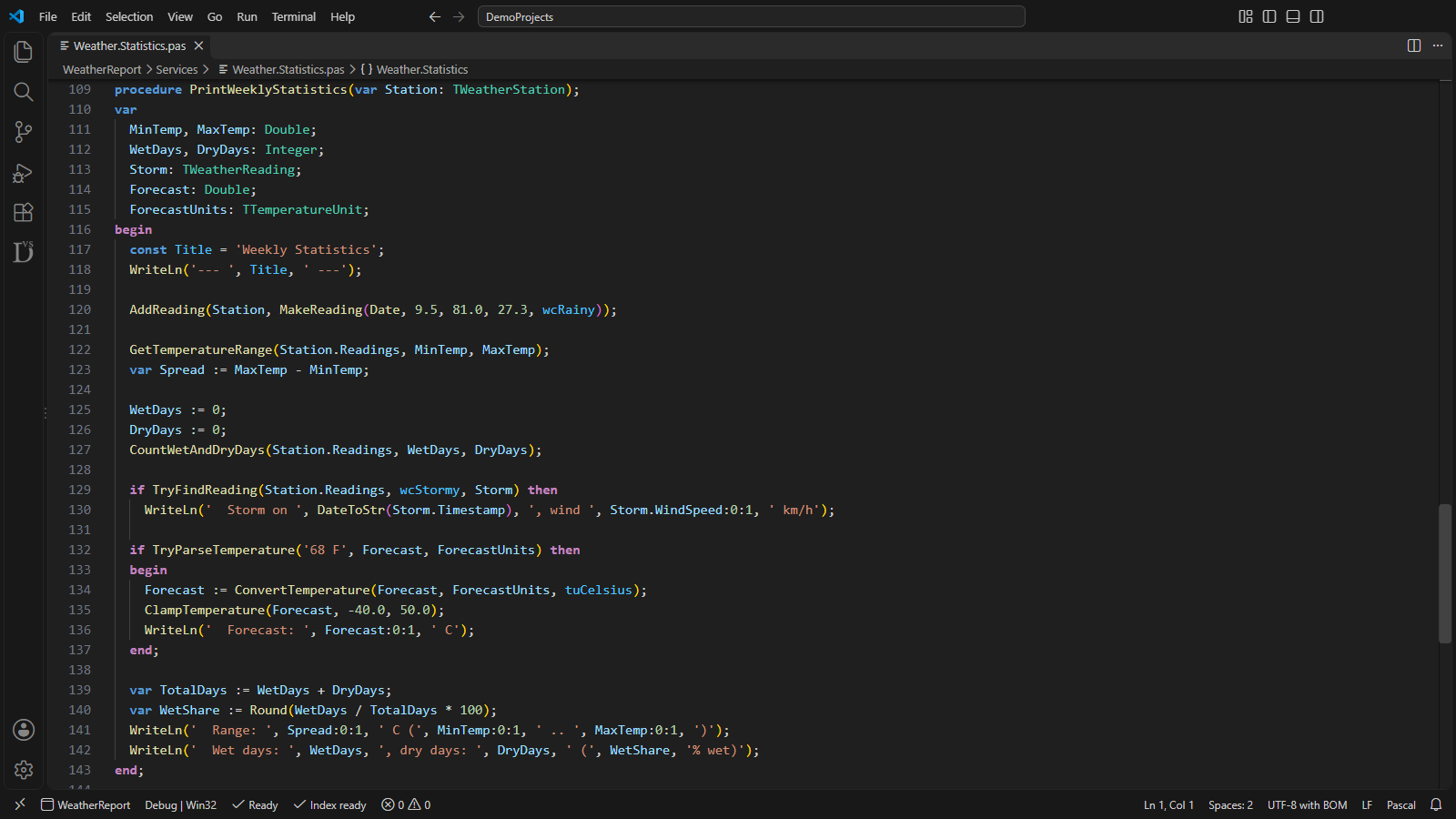
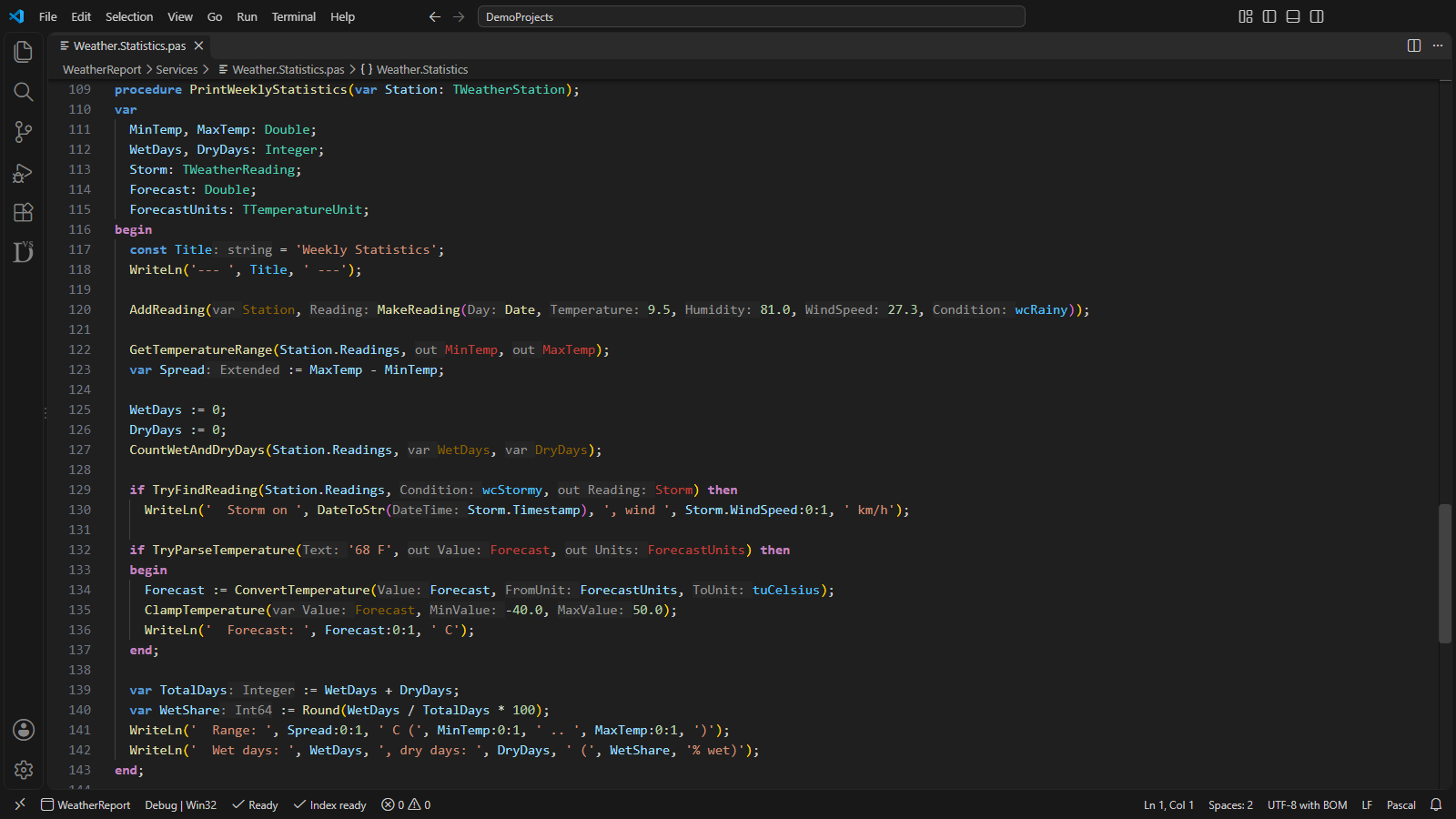
Left, the code as written. Right, every setting on: parameter names for all arguments with matching names hidden, var and out as hints and colors, and inline variable types. The file content is identical in both.
Standard in other languages, new to Delphi
Inlay hints are an established part of professional editing: VS Code, Visual Studio and the JetBrains IDEs show them for TypeScript, C#, Java, Kotlin and Rust. Vallenta Studio adds them to Object Pascal editing in VS Code.
As of October 2026, neither RAD Studio 13.2 nor Embarcadero's DelphiLSP shows inlay hints, and no maintained Delphi or Pascal extension for VS Code or the JetBrains IDEs does. Marks for var and out arguments at the call and the types of inline variables are shown by no other Delphi tool.
Based on a review in October 2026 of RAD Studio 13.2, DelphiLSP, the Delphi and Pascal extensions on the VS Code Marketplace and Open VSX, the Pascal plugins for JetBrains IDEs, and the common IDE add-ins.
Names, modes and types, resolved by the language server
Parameter names
The name of each parameter appears before its argument. With Literal arguments, only numbers, strings, characters, Boolean values, nil and bracket lists of literals are named, the arguments whose purpose is not evident from the call. With All arguments, every argument is named.
// Literal arguments
ClampTemperature(Forecast, MinValue: -40.0, MaxValue: 50.0);

// All arguments
ClampTemperature(Value: Forecast, MinValue: -40.0, MaxValue: 50.0);
var and out at the call
An argument passed to a var or out parameter is preceded by var or out. The variables written by the routine are visible at the call, without opening its declaration. Value and const parameters get no mark.
GetTemperatureRange(Station.Readings, out MinTemp, out MaxTemp);
CountWetAndDryDays(Station.Readings, var WetDays, var DryDays);
ClampTemperature(var Forecast, -40.0, 50.0);
Colors for var and out arguments
The same arguments can be colored instead of marked, or both. The color applies to the argument at that one call only; in the next statement the variable has its normal color. In Summary.WetDays both names are colored, in Forecasts[Day] only Forecasts. The default colors are amber for var and coral for out; on Pro, the var argument and out argument rows of Edit symbol colors… set them.
GetTemperatureRange(Station.Readings, MinTemp, MaxTemp);
var Spread := MaxTemp - MinTemp;
CountWetAndDryDays(Station.Readings, WetDays, DryDays);
CountWetAndDryDays(Station.Readings, Summary.WetDays, Summary.DryDays);
ClampTemperature(Forecasts[Day], -40.0, 50.0);
Inline variable types
An inline variable or constant declared without a type shows its inferred type after the name. This covers inline var and const declarations and the loop variable of a for loop. The type is computed by the same inference as hover, so hint and hover show the same type; a type that does not resolve gets no hint.
const Title: string = 'Weekly Statistics';
var Spread: Extended := MaxTemp - MinTemp;
var TotalDays: Integer := WetDays + DryDays;
var WetShare: Int64 := Round(WetDays / TotalDays * 100);
for var Day: Integer := 1 to TotalDays do
  ClampTemperature(Forecasts[Day], -40.0, 50.0);
Hide matching names
An argument with the same name as its parameter gets no name hint, such as Station.Readings passed to Readings. The last identifier of the argument is compared with the parameter name, case-insensitively; LOwner and AOwner count as different names. The setting is on by default and takes effect once parameter names are switched on.
// Hide matching names on
GetTemperatureRange(Station.Readings, MinTemp, MaxTemp);
Chart := CreateChart(AOwner: LOwner);

// Hide matching names off
GetTemperatureRange(Readings: Station.Readings, MinTemp: MinTemp, MaxTemp: MaxTemp);
Chart := CreateChart(AOwner: LOwner);
Events and procedural types
A call through an event, a procedural variable or parameter, a TProc<T> variable, an array element of a procedural type or the result of a function call gets the same hints and marks as a direct call. The parameter names are read from the declaration of the procedural type.
if Assigned(FOnChange) then
  FOnChange(Sender: Self);

// Report: TProc<string>
Report(Arg1: Title);Each setting, on the same routine
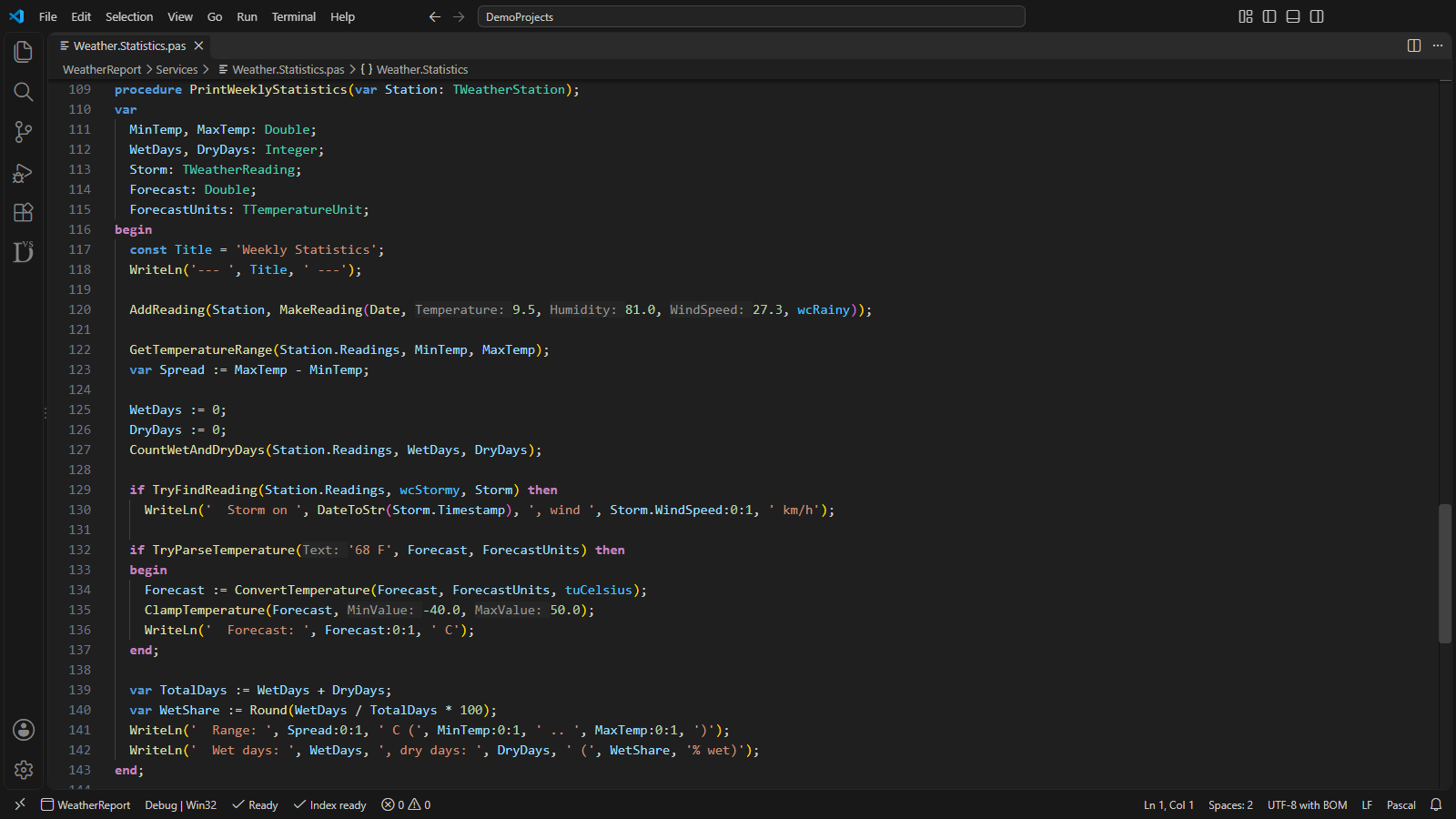
Names before 9.5, 81.0, 27.3, '68 F', -40.0 and 50.0 only; variables and enum values stay unmarked.
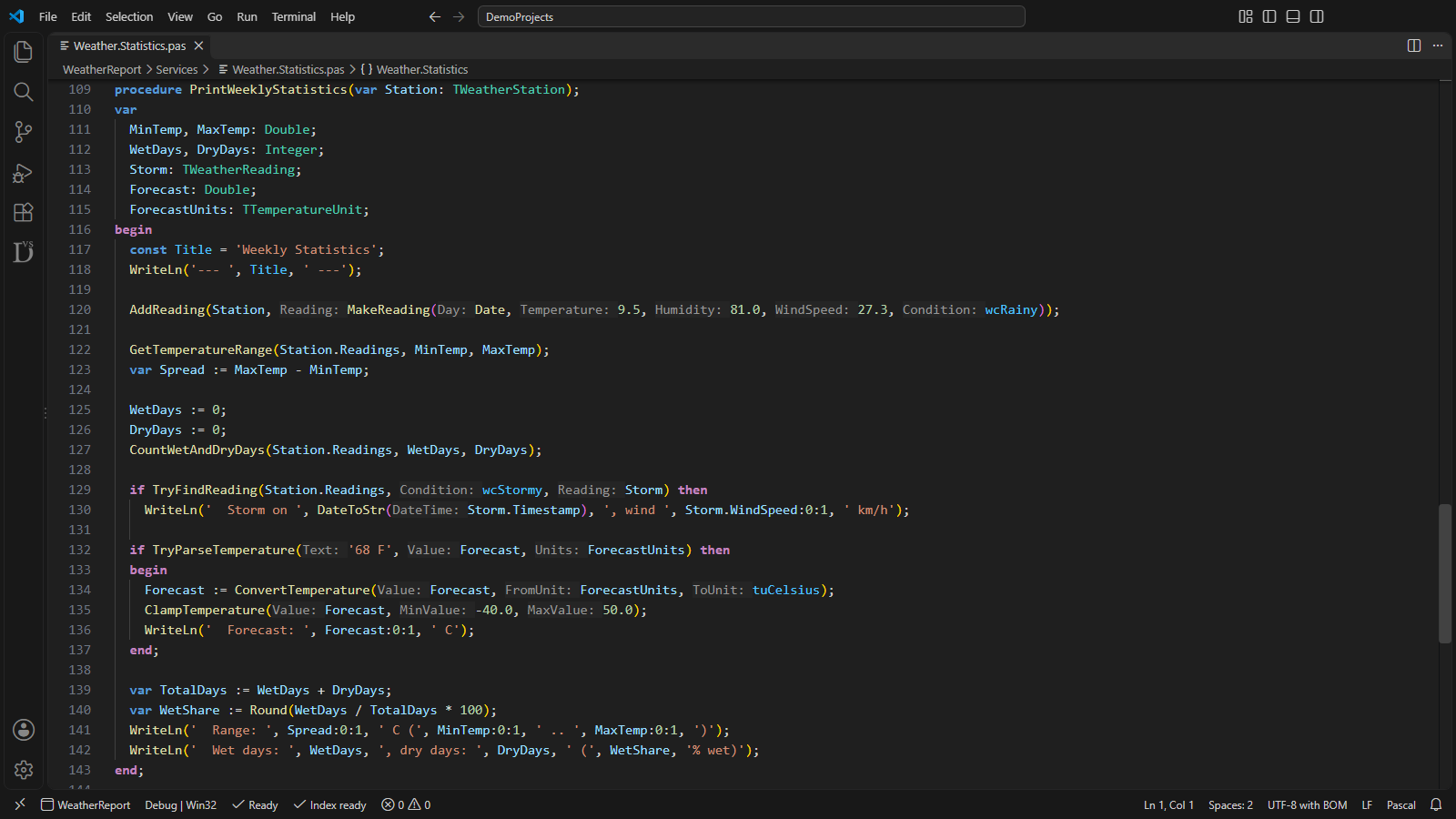
Every argument named, except where the argument has the parameter's name: Station.Readings, MinTemp and WetDays get none.
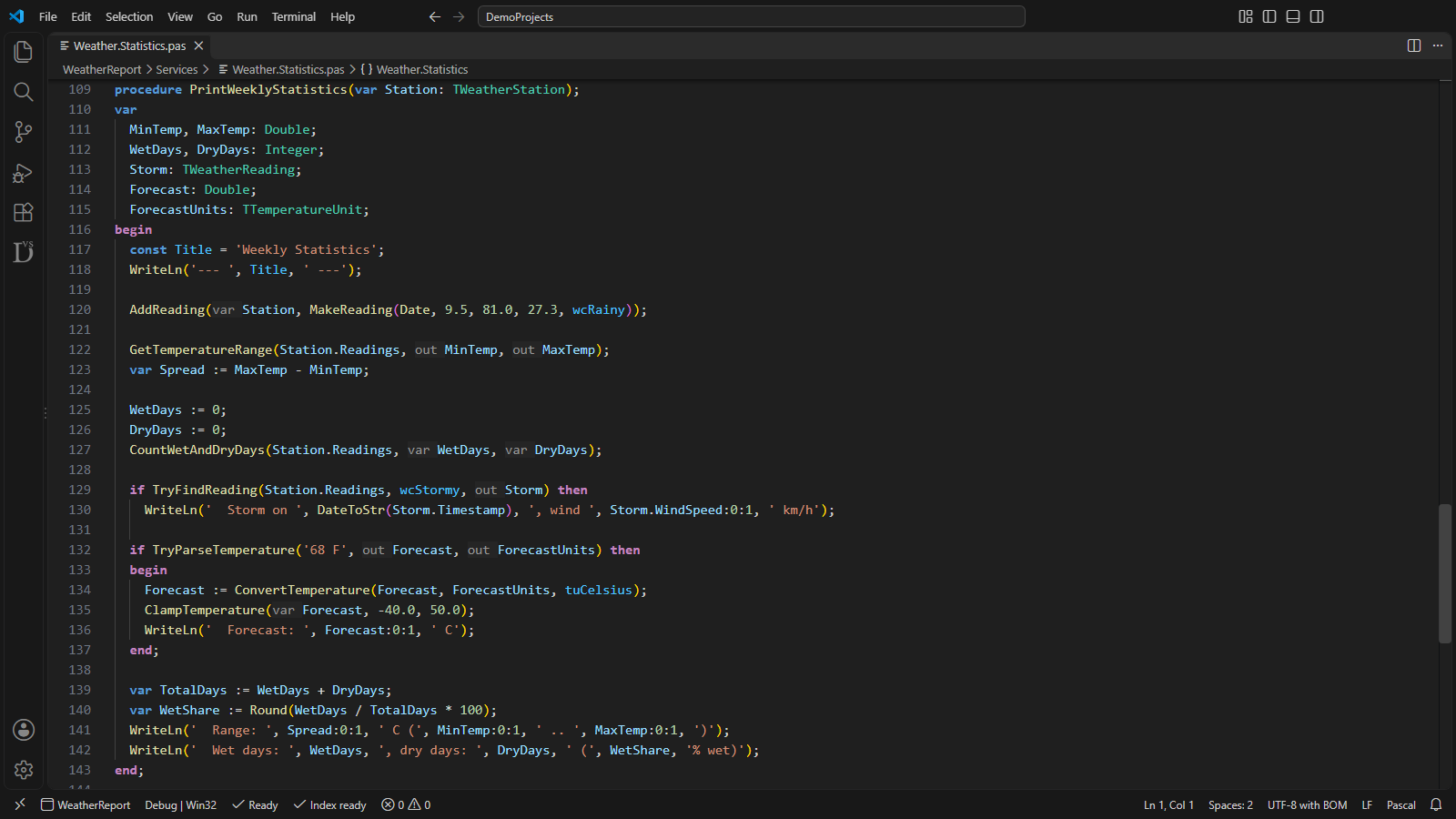
var before Station, WetDays, DryDays and Forecast; out before MinTemp, MaxTemp, Storm and ForecastUnits.
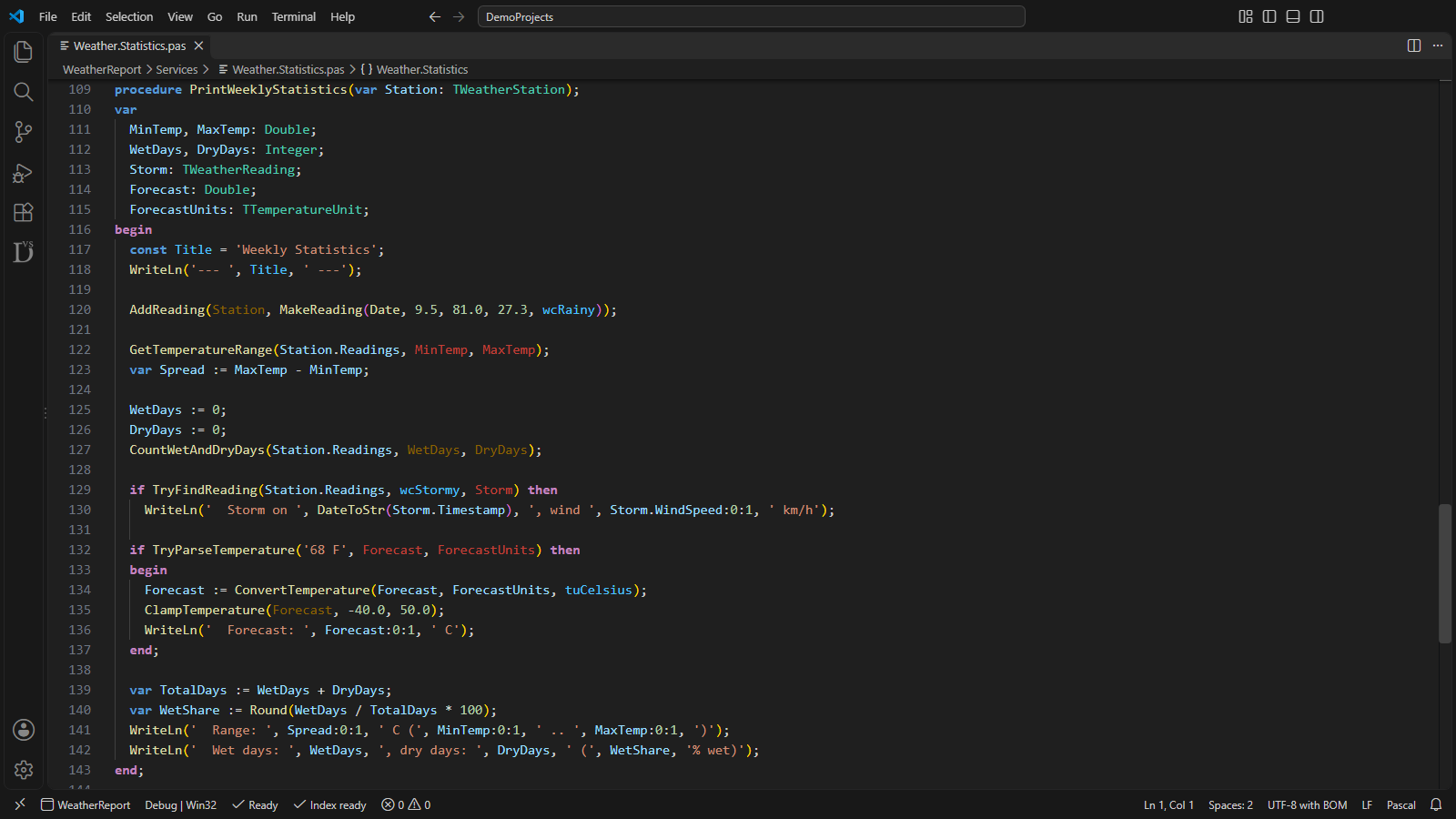
The same arguments in the var argument and out argument colors, without added text.
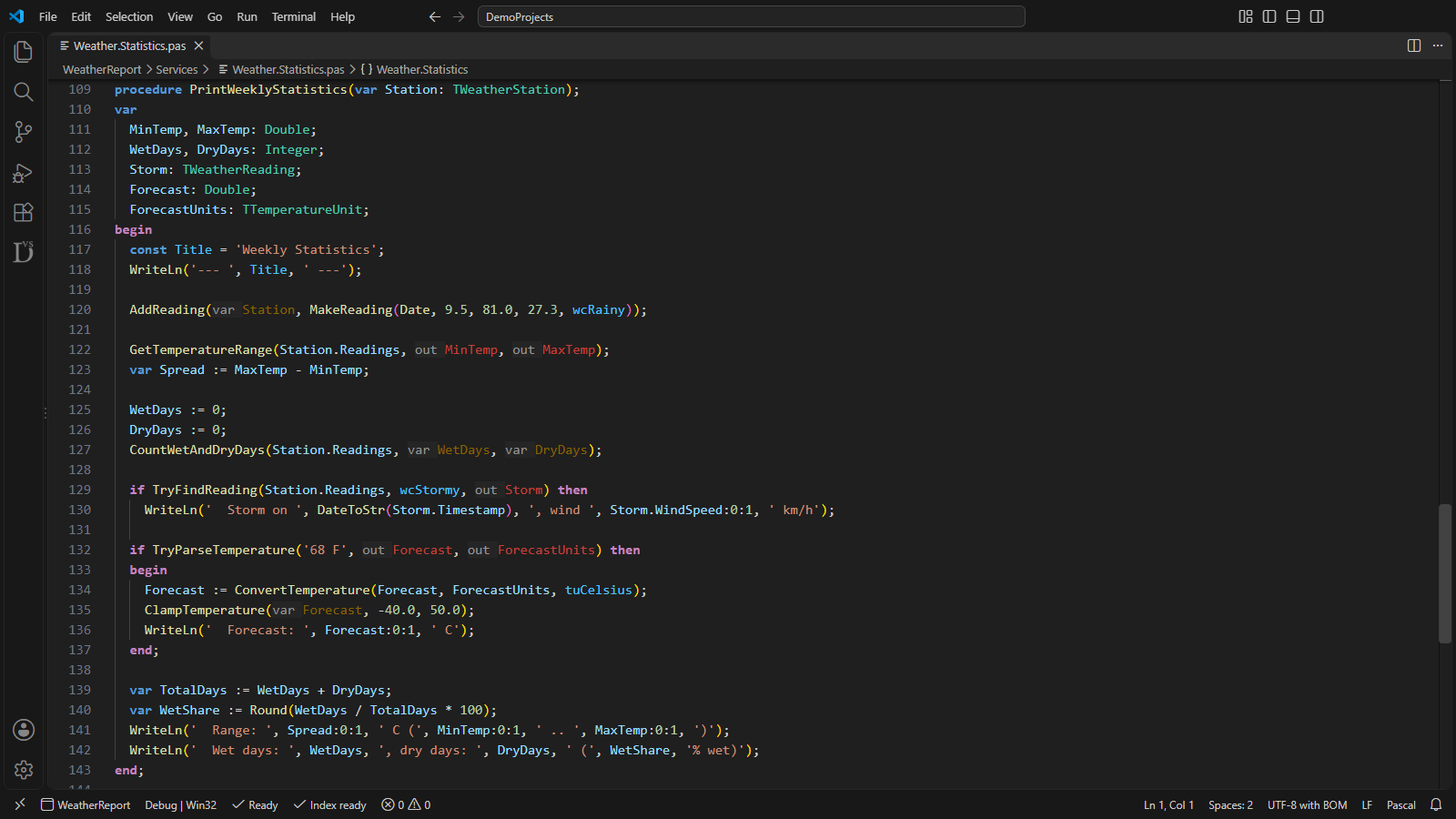
Both settings on: the mark and the color on each argument.
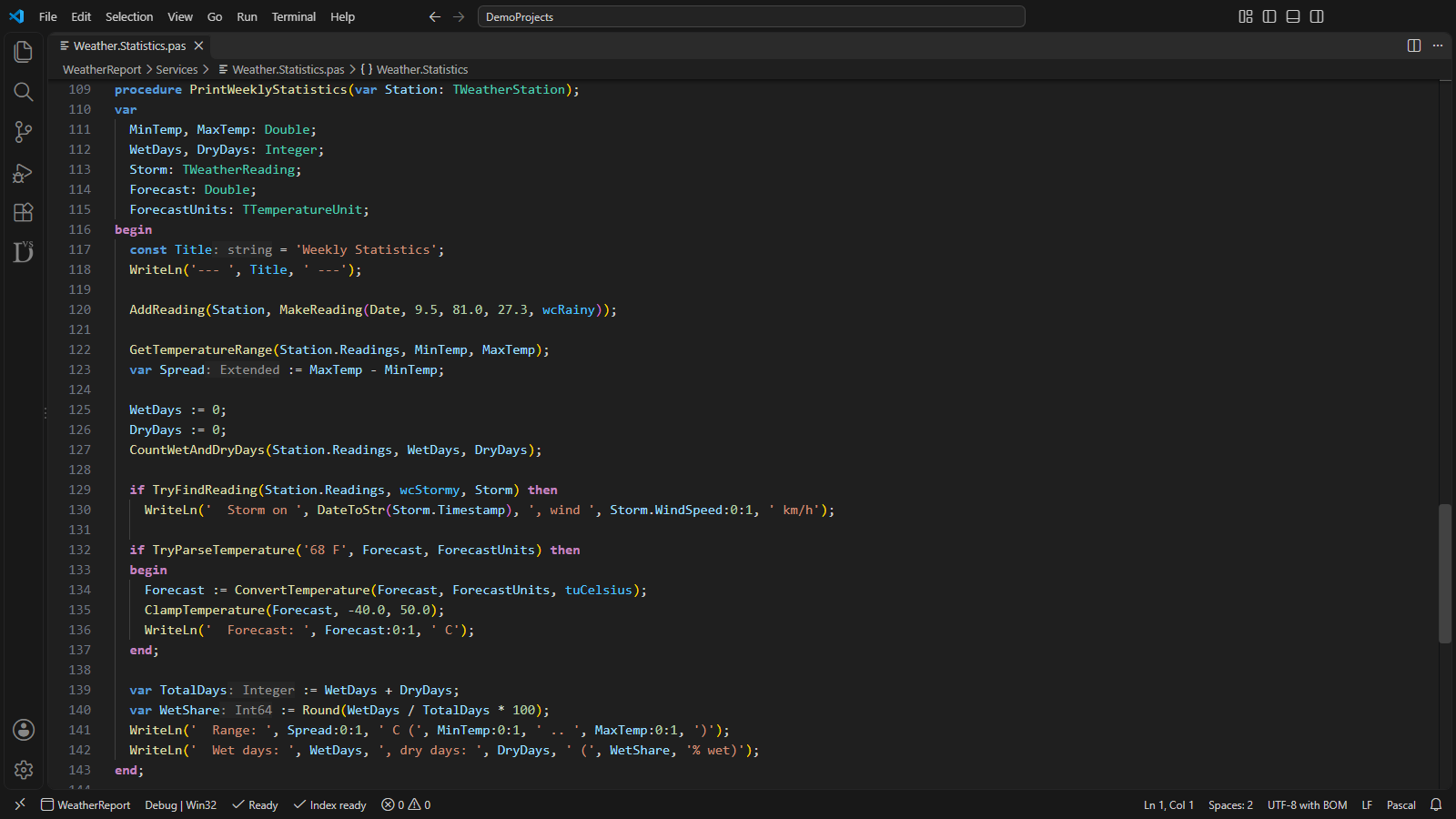
Inferred types after Title, Spread, TotalDays and WetShare: string, Extended, Integer and Int64.
Off by default, switched per hint
The two var/out switches are on the Code highlighting tile of the Vallenta Studio settings page, next to the other highlighting switches; the code preview of the tile shows them as they appear in the editor. The Inlay hints… button of the tile opens a dialog with the three Pro settings and a preview of its own. Every hint and color is off by default, so an update leaves the editor unchanged until a hint is switched on.
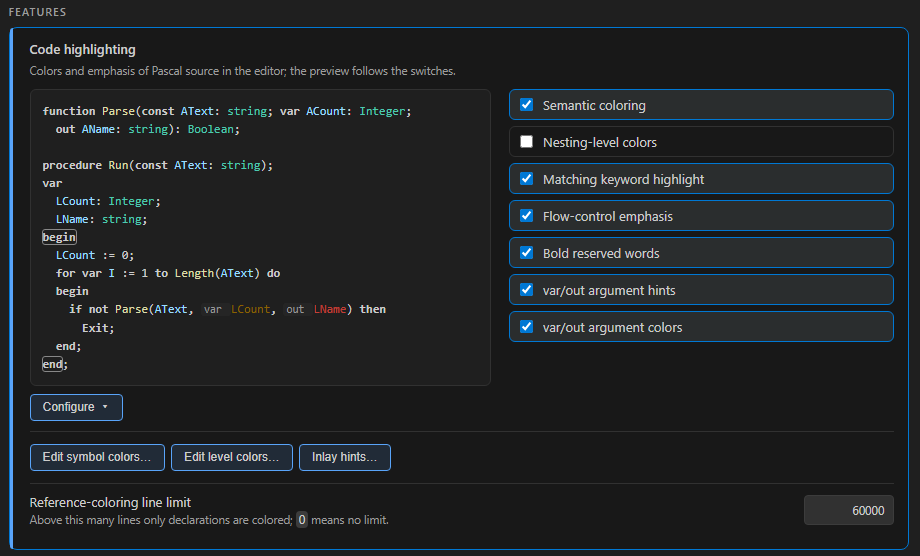
The var/out argument hints and var/out argument colors switches, and the Inlay hints… button.
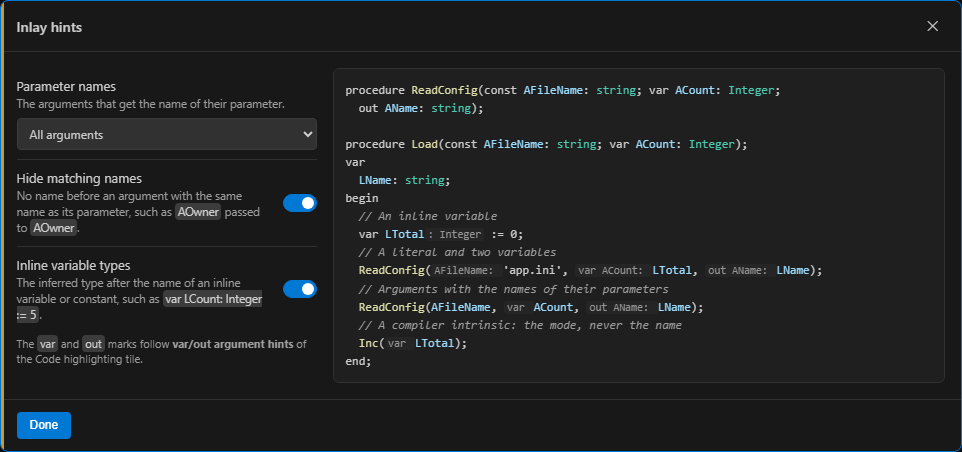
Parameter names, Hide matching names and Inline variable types, with a preview that follows the controls.
VS Code's own editor.inlayHints.enabled applies in addition: with offUnlessPressed the hints appear only while Ctrl+Alt is held, with onUnlessPressed they disappear while it is held. The Inlay hints dialog shows a note when this setting hides them.
Inc, SetLength, Str, Val, ReadLn and the other intrinsics with var parameters get the var mark, without parameter names.Str, the width and precision after the value are not counted as arguments; the string variable gets its var mark.var/out marks on the Free plan, names and types on Pro
- var and out hints before arguments passed by reference
- var and out argument colors, in the default colors
- var and out marks on calls through events and procedural types
- Both switches on the Code highlighting tile
- Everything in the Free plan
- Parameter names before literal arguments or before every argument
- Hide matching names
- Inferred types of inline variables and constants
- Custom var argument and out argument colors in Edit symbol colors…
Inlay hints for Delphi, with Vallenta Studio
var and out marks and colors are part of the Free plan. Parameter names and inline variable types are part of Pro; every Pro feature is available free for 5 days after registration.