
MCP Server for AI agents
Vallenta Studio hosts a local MCP server. Through it, an AI agent reads the Delphi model the IDE uses: symbol resolution, references, implementations, completion, diagnostics, the active project's configuration and the build pipeline. GitHub Copilot agent mode and Claude Code connect to it. Each answer is produced by the language server, the build pipeline or the debug session, not by a text search over the source. Debugging over MCP is available since version 1.2.4: the agent launches or attaches to the program, sets breakpoints, steps, and reads the call stack, locals and expression values at each stop.
Two prompts in Copilot agent mode. "find all references of TWeatherStation" is answered from the language server's index with 12 locations; "build the project" runs the Build toolbar's pipeline and returns configuration, platform, error and warning counts.
The model the IDE uses, over MCP
An AI agent normally works from the source text: it searches the files for a name and reads the matches. A text match carries no semantic information. It does not show which of several same-named declarations a name refers to, that Object Pascal identifiers are case-insensitive (TFoo and tfoo are one symbol), or that a code branch excluded by an {$IFDEF} for the selected configuration and platform is not compiled at all. Whether the project builds is known only after a build.
The MCP server supplies the answers the IDE has: the language server that runs for each project resolves names, references and implementations, the build pipeline reports the result of a build, and the debug session reports each stop of the running program. An agent locates a symbol, reads its declaration, lists its references and implementations, reads the active project's configuration, starts a build and reads the errors. It then sets a breakpoint, launches the project under the debugger and reads the locals at the stop.
Source edits are performed by the agent's own file tools; they are not part of the MCP surface.
Connected in one step
GitHub Copilot, agent mode
VS Code 1.102 and later discover the server automatically. The Vallenta Studio tools are listed in agent mode while the server runs; no configuration file is edited.
Claude Code
The MCP Server card on the settings page registers the server with the Claude Code CLI for the current workspace, and removes the registration again. Registration runs the claude CLI, so the access token is written to Claude's user-private configuration and not into the repository. Copy connect command copies the claude mcp add line for a CLI that is not on PATH.
Any MCP client
The server speaks MCP over streamable HTTP at http://127.0.0.1:<port>/mcp and requires a bearer token. MCP: Show Server Status displays the URL. The port is assigned automatically and remembered per workspace, or fixed in the workspace settings.
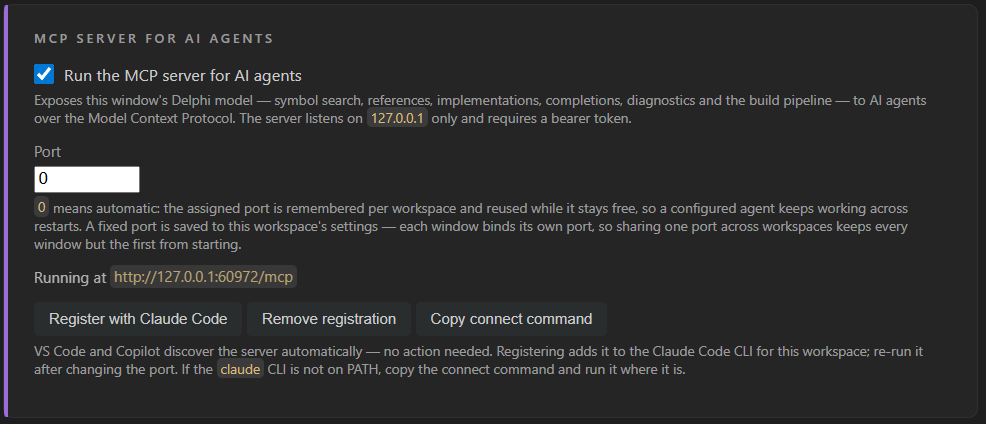
Enable switch, port, the running URL and the Claude Code registration buttons.
Resolved semantics, tool by tool
Symbols resolved by the language server
find_symbol locates a type, routine or unit by name. get_symbol_info returns the declaration, type and signature. go_to returns the definition, the implementation body or the declaration. Names resolve case-insensitively and by uses-clause visibility: a same-named type in a unit the file does not use is reported as a different symbol.
References and implementations
find_references returns every use of a symbol across the project, .dfm and .fmx files included; overloads are returned as one name group. find_implementations returns the classes that implement an interface or the methods that override a virtual. Both read the index the editor's Find All References reads.
Completion, outline, diagnostics, inactive code
get_completions returns the members of an expression or the units a uses clause can take. get_document_symbols returns the outline of a file, get_diagnostics the language server's problems for a file, get_inactive_regions the lines switched off by {$IFDEF} under the selected configuration and platform.
Project model and build control
get_projects and get_project_info return the registered projects, the selected configuration and platform, defines, search paths and the unit list; set_active_project makes a registered project the active one, set_build_config changes configuration or platform. build compiles the selected project through the MSBuild pipeline the Build button runs and returns errors, warnings and diagnostics as structured records. cancel_build stops a build; get_build_output returns the output of a build that outlasts the agent's tool timeout.
Debug sessions driven by the agent
start_debugging launches the active project as F5 does; attach_debugger attaches to a running process by pid or image name. add_breakpoints sets source and routine breakpoints (Unit.TClass.Method) with conditions in Delphi syntax, hit counts and logpoint messages. run_until_stop, step, pause and run_to_line return the next stop: reason, location, hit breakpoints, exception.
Inspection at a stop
get_stop_snapshot returns the stop, the top frames and the locals in one result. get_variables and expand_value return an object's [Properties] and [Fields]; evaluate runs an expression through the Delphi expression evaluator; get_exception returns class and message; get_debug_output returns the program's and the debugger's output, logpoint messages included. Values are rendered in Delphi form: [waWind, waFrost], wcStormy, (12, 18, 7, 21).
One conversation, as recorded
References, then a build
GitHub Copilot, agent mode- Ran
find_symbol- Vallenta Studio (MCP Server) - Ran
find_references- Vallenta Studio (MCP Server)
Found 12 references to TWeatherStation: Weather.Types.pas:51 (declaration), WeatherReport.dpr:16, Weather.Formatter.pas:12, :13, :77, :87, Weather.Data.pas:8, :9, :10, :17, :76, :87.
- Ran
build- Vallenta Studio (MCP Server)
Build succeeded for WeatherReport.dproj. Configuration: Debug. Platform: Win32. Errors: 0. Warnings: 0. Compiler output: 100 lines, 0.19 seconds.
The tool calls listed are the ones Copilot selected from the server's instructions. The same tools are available to Claude Code and to any MCP client.
The tools, by group
find_symbolLocates a type, routine or unit by namego_toDefinition, implementation body or declaration of a symbolfind_referencesEvery use of a symbol, overload group includedfind_implementationsClasses implementing an interface, methods overriding a virtualget_symbol_infoDeclaration, type and signature of a symbolget_completionsMembers of an expression, or the units a uses clause can takeget_document_symbolsOutline of one fileget_diagnosticsThe language server's problems for one fileget_inactive_regionsLines switched off by the preprocessor
get_projectsRegistered projects and the selected oneget_project_infoConfiguration, platform, defines, search paths, unit listset_build_configChanges the selected configuration or platformbuildCompiles the selected project; structured errors and warningscancel_buildStops a running buildget_build_outputOutput of the current or last buildset_active_projectMakes a registered project the active one
get_debug_stateSession state, current stop, expression syntax, exception ruleslist_processesAttach candidates with debug access, symbol state and platformstart_debuggingLaunches the active project as F5 doesattach_debuggerAttaches to a running process by pid or image nameend_debug_sessionTerminates a launched program or detachesadd_breakpointsSource and routine breakpoints with condition, hit count, logpointremove_breakpointsRemoves breakpointsget_breakpointsBreakpoints and their verification stateset_exception_rulesException classes the debugger skips
run_until_stopContinues and returns the next stopstepStep over, into or out; statement or instructionpausePauses a running programwait_for_stopWaits for a stop after a timed-out execution toolrun_to_lineRuns to a source lineget_stop_snapshotThe stop, the top frames and the locals in one resultget_stackFrames of a thread, routines in Delphi spellingget_threadsThreads of the sessionget_variablesLocals or registers of a frameexpand_valueChildren behind a value handle, [Properties] and [Fields]evaluateAn expression in Delphi syntaxget_exceptionClass and message of the exception the program stopped onget_debug_outputProgram output and debugger output, logpoint messages includedget_modulesLoaded modules with their symbol state
Instructions delivered at connect
At connection the server sends its usage instructions to the agent: which tool answers which question, and the Object Pascal rules a text search does not apply.
- Identifiers are case-insensitive:
TFoo,tfooandTFOOare one symbol. - Visibility follows the uses clause, not the directory. A same-named type in a unit the file does not use is a different symbol.
- Overloaded routines share one reference set;
find_referencesreturns the whole name group. - Code in an inactive
{$IFDEF}branch is not dead text; which branch is active depends on the selected configuration and platform. get_diagnosticsreports the language server's semantic validation;buildis ground truth.- Text search is reserved for
.dfmand.dprojfiles, comments and string literals.
- Change a signature safely
get_symbol_infofind_referenceseditbuild - Fix a failing build
buildgo_toeditbuild - Add a unit to a uses clause
get_completionsat the uses clause; the units returned are the reachable ones, which excludes circular-reference candidates - Reproduce a bug
add_breakpointsstart_debuggingget_stop_snapshotevaluatestepend_debug_session
Debugging over MCP
Version 1.2.4 added 23 debugging tools. An agent launches the active project or attaches to a running process, sets breakpoints with conditions in Delphi syntax, hit counts and logpoint messages, runs and steps with each stop returned in the reply, and reads the call stack, threads, locals, expression values, the current exception and the program output. The tools drive the session shown in VS Code's Run and Debug view, so every stop is visible and the session can be paused or ended from the IDE at any time. Debugging over MCP covers Win32, Win64 and Linux64 programs.
One prompt: set a breakpoint at WatchShowcase.pas line 196, start the project, list the locals at the stop. Copilot calls add_breakpoints, start_debugging and get_stop_snapshot; the Run and Debug view shows the same session.
Breakpoint, launch, locals
GitHub Copilot, agent mode- Ran
add_breakpoints- Vallenta Studio (MCP Server) - Ran
start_debugging- Vallenta Studio (MCP Server) - Ran
get_stop_snapshot- Vallenta Studio (MCP Server)
Breakpoint hit at WatchShowcase.pas:196 in WatchShowcase.ShowcaseScene. Alerts: [waWind, waFrost] · Condition: wcStormy (3) · Headline: 'Detailed [80%]: Storm front moving in from the west' · IsSevere: True · Location: 'Vienna Central' · Report: TDailyReport($03352E80) · ShortValue: 'SHORT' · Temperatures: (12, 18, 7, 21) · vTest: 80. The debug session remains stopped at the breakpoint.
- Execution tools wait up to
vallenta.studio.mcp.debugWaitSeconds(default 30 s); a timeout returnstimedOutwhile the program keeps running. - Breakpoints set by the agent appear in the Breakpoints view and persist per project.
- One Delphi debug session per window, shared with the Run and Debug view.
- The last 5000 lines of program and debugger output are kept per session.
vallenta.studio.mcp.enabled stops the server; the free tier has no server.vallenta.studio.mcp.port in the workspace settings.get_build_output returns its result.How a tool call is answered
Each VS Code window hosts one MCP server inside the extension. A tool call is answered by the language server that runs for the project (symbols, references, completion, diagnostics) or by the build pipeline (the MSBuild invocation the Build button runs, with structured output). No source is re-parsed for the agent. Debugging calls are answered by the debug session, through the debug adapter the Run and Debug view uses, so Delphi rendering, deferred conditions and the exception ignore list apply unchanged.
Local only
- The server listens on
127.0.0.1and is not reachable from the network. - Every request carries a bearer token; requests with a foreign host header are rejected.
- The token is written to the agent's user-private configuration, never into the repository.
vallenta.studio.mcp.enabledset to false stops the server.- The server sends nothing to any model. What an agent sends to its model is governed by the agent.
Scope
- Read, build and debug. Source edits and renames are not performed over MCP; a rename tool with preview is planned.
- Debugging over MCP covers Win32, Win64 and Linux64 programs.
- Requires a Pro subscription or the trial. Automatic discovery requires VS Code 1.102 or later; older versions connect through the connect command.
Delphi code intelligence for AI agents, with Vallenta Studio Pro
Included in the Pro plan. Every Pro feature is available free for 5 days after registration.