
Code Navigation
Find any symbol, jump to any definition, and list every use of a symbol across the project - resolved by the language server's symbol index, not by text search. The same index powers project-wide Rename.
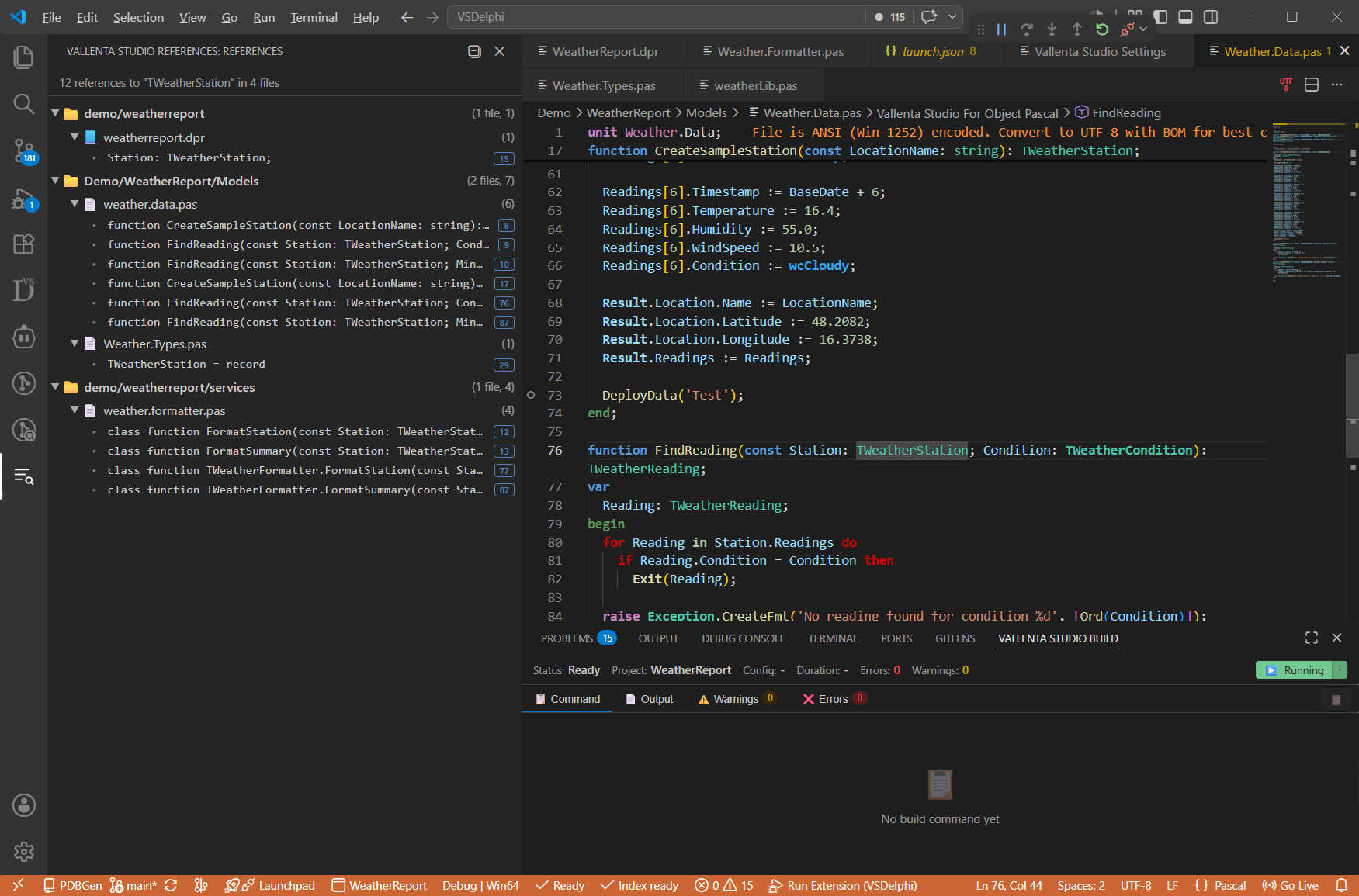
Search by symbol, not text
Find All References, Find Symbol and Go to Definition resolve through the language server's symbol index: they follow uses-clauses, interface and implementation sections, and inheritance. Results are scoped to what your project actually references and span every unit, not just the open file, and they do not rely on the compiler or on plain-text matching. The difference is largest for common names, where a text search returns many unrelated hits.
Find references, symbols and definitions
Find All References
Put the cursor on any symbol and press Shift+F12 (or right-click, Find All References) to list every use across the project, resolved semantically. It covers local variables and parameters; unit-level types, routines, constants and enum members; and type members - methods, fields, properties, constructors, destructors, helpers and interface methods. Override matching is per-overload, so searching one overload returns only its uses and its descendant overrides. Matches inside .dfm/.fmx forms are included: component types, event-handler bindings and property values.
A Results View Built to Navigate
Results stream into a sidebar grouped on three levels - directory, then source file, then match - with each match showing its code line and the line number as a right-aligned pill. Group headers carry their own file and match counts, and expand/collapse state is preserved across streaming updates and re-runs. A scope picker searches either the project closure (only the files your project transitively uses) or every indexed source, so a common name like TSearchRec does not pull in hits from libraries you never reference.
Find Symbol
Press Ctrl+T (or right-click, Find Symbol) to open a workspace symbol picker across the indexed project: classes, records, interfaces, methods, properties and unit-level symbols. Type a few characters to filter and jump. It uses the standard VS Code quick-pick.
Go to Definition, Declaration & Implementation
Ctrl+Click or F12 jumps to a symbol's definition, narrowing to the matching overload for overloaded routines - on every plan. A setting controls whether F12 lands on the declaration or the implementation body; symbols with no body (types, fields, constants, abstract or external methods) always go to the declaration. On Pro, Shift+Ctrl+Up and Shift+Ctrl+Down move between an interface declaration and its implementation body.
Find any symbol with Ctrl+T
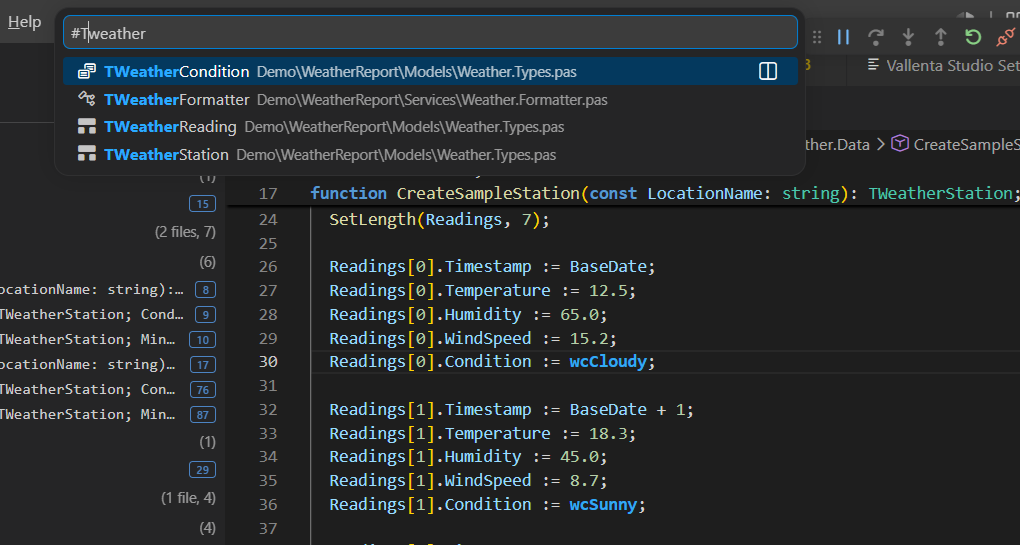
Filter classes, records, interfaces, methods, properties and unit-level symbols across the indexed project, then jump.
Project-wide Rename
The same symbol resolution behind Find All References now powers safe, project-wide renaming. Press F2 to rename a symbol and every use of it at once - across its declaration, implementation, and all references.
- Rename locals and inline vars, unit-level types, routines, variables and constants
- Rename type members - methods, fields, properties, constructors, destructors and helpers
- Updates references inside .dfm/.fmx forms - event handlers like Button1Click and component properties
- Clashing or unsafe renames are blocked with a short explanation and a jump to the conflict
Find your way around any codebase, with Vallenta Studio
Find Symbol and Find All References are free. Advanced navigation is part of Pro - try every Pro feature free for 5 days when you register.