
The Memory View
The memory view shows the memory of a stopped Delphi program as rows of address, hex bytes and text, in an editor tab beside the source. It opens on a Variables or Watch row, on an expression or on an address, marks the bytes of the value, and highlights the bytes changed since the previous stop. Pinned views show the memory of several variables side by side. Display formats, a data inspector, pointer following, search, copy and editing are part of the view.
Two steps over the assignments to Packet.Header. At each stop the bytes written by the step are highlighted and counted in the header line: 4 for the magic 'WXPK', 1 for the version.
A value, as bytes in memory
The Variables and Watch views show a value as Delphi text. The memory view shows the bytes behind it: the fields of a record in their order in memory, the header in front of a string, the instance of an object, and the memory around them.
The bytes belonging to the value are underlined and its first byte is outlined. The header line above the grid names the value, its Delphi type, its address and its size, and counts the bytes changed at the last stop. Unreadable bytes show as ??.
From a variable, an expression or an address
The memory icon on the Packet row of the Variables view opens the view beside the source, on the 28 bytes of the record.
- Variables and Watch views: the memory icon on the row under the mouse, or Show in Memory View in the row's context menu. A Watch expression without an address in the program, such as
A + B, is answered with a message. - Source editor: Show in Memory View in the context menu while the program is stopped, for the selection or the identifier chain at the cursor, such as
Self.FItems. - Command palette: Vallenta Studio: Open Memory View… for an address in
$or0xnotation or a Delphi expression. - Address field of the view: an expression or address entered there replaces the target of the view. The field lists the last 20 entries of the workspace.
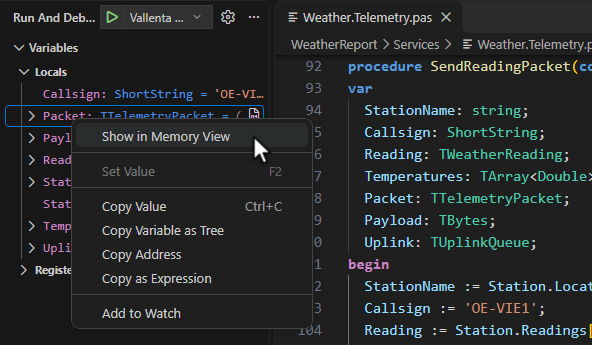
Show in Memory View in the context menu of a Variables row; the Watch view has the same entry.
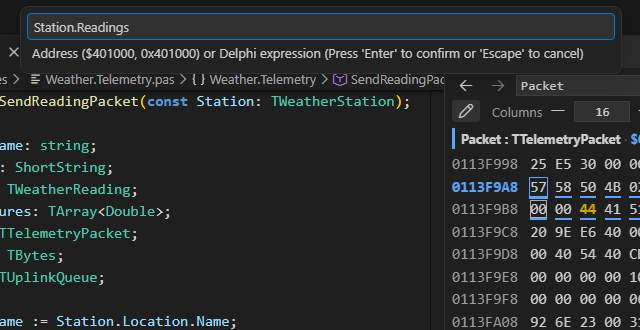
Open Memory View… takes an address such as $401000 or a Delphi expression such as Station.Readings.
Several variables, watched at the same time
A pinned view keeps its value while other values open in views of their own. The memory of several variables then stays on screen side by side, and each view highlights the bytes changed by a step, such as a record and the byte array copied from it, or a buffer and the pointer into it.
The view of Packet is pinned; the memory icon on Payload then opens a second view beside it. Both show the same 28 bytes: Payload holds the copy made by BytesOf(@Packet, SizeOf(Packet)).
- Without a pin, a newly opened value replaces the content of the session's unpinned view.
- The pin button keeps a view on its value. The next value opens in a second view; pinning that one as well opens a third.
- Every view is read again at each stop and highlights its own changed bytes. A write in one view is marked in every view that shows the bytes.
- Opening a value already shown in a view brings that view to the front. The address field of a pinned view still changes its target.
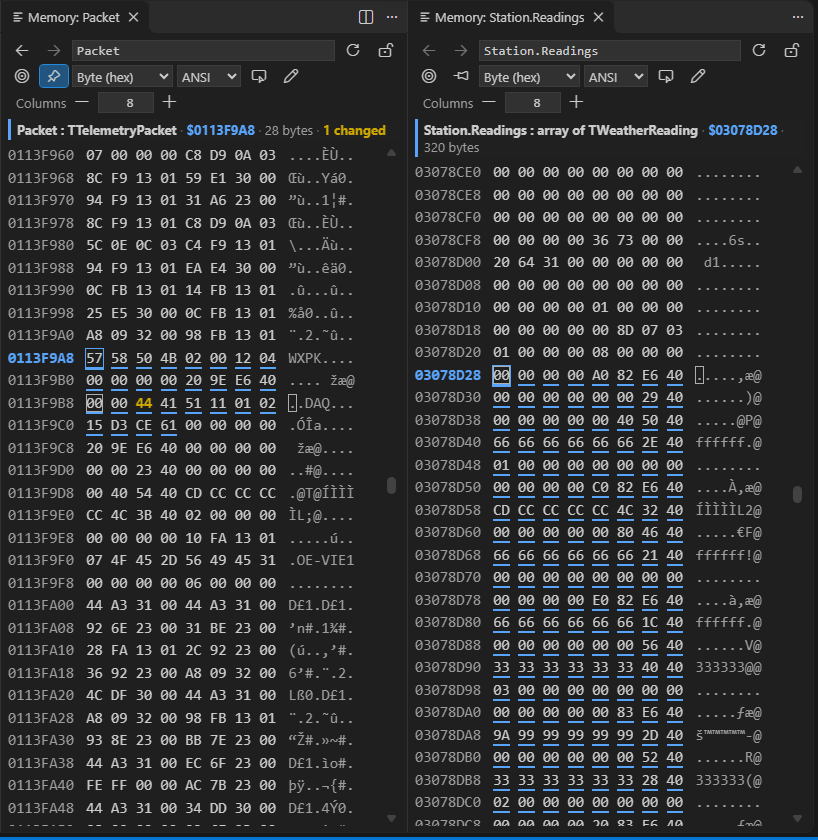
Packet in a pinned view, Station.Readings in a second view beside it, both at 8 bytes per row. The byte written into Packet is marked as changed.
The data, not the pointer to it
A string, a dynamic array, an object or an interface variable holds a pointer. The view opens on the memory at that pointer and marks the extent of the data there. The address and the size are computed by the Delphi expression evaluator of the debugger:
string, AnsiString, WideStringthe characters; the length is read from the string header in front of themInstanceSize of its runtime class, read from the class's VMT@Xthe storage of X itself, so @P shows a pointer variable rather than its targetPointer(X)the memory at the value of the integer X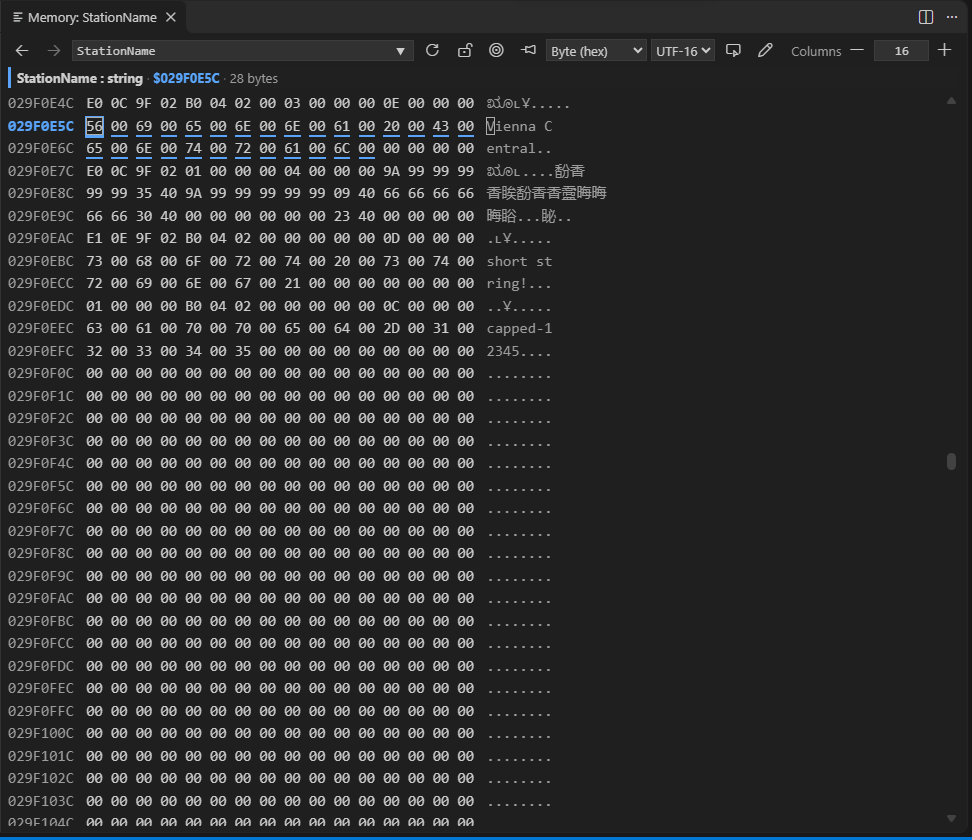
StationName: string opens on its characters: 28 bytes for the 14 UTF-16 characters of 'Vienna Central'. The row above ends in the string header: code page 1200 (B0 04), element size 2, reference count 3, length 14.
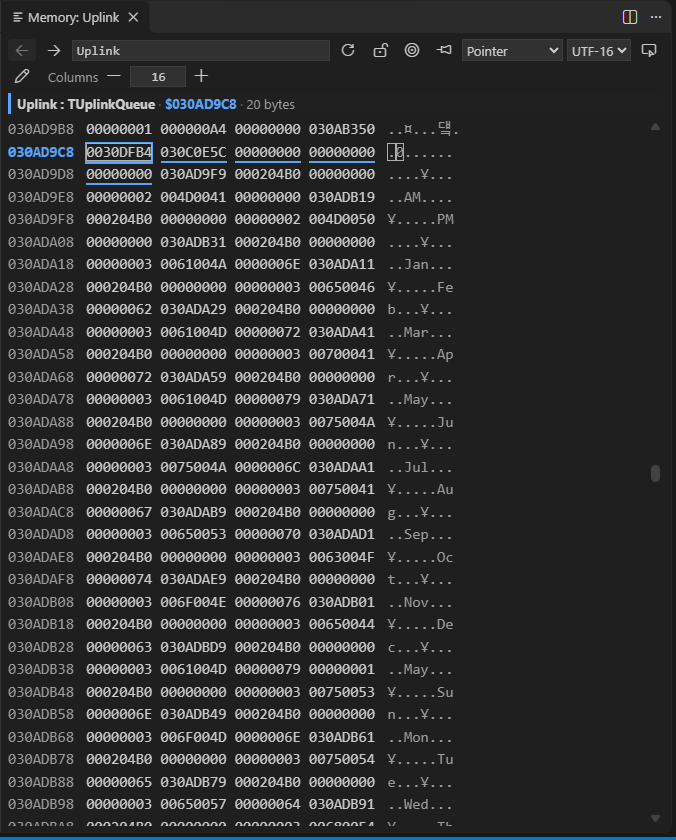
Uplink: TUplinkQueue opens on the object instance, 20 bytes, the InstanceSize of its class, here in the Pointer format. The first field is the class pointer.
Bytes as Delphi types, text in three encodings
The display format selects how the cells read the bytes: Byte, Word, Cardinal and UInt64 in hex; ShortInt, SmallInt, Integer and Int64; Byte, Word, Cardinal and UInt64 in decimal; Single, Double and Extended; Pointer. Extended is offered where it is 10 bytes, on Win32 and Linux64. The text column decodes the same bytes as ANSI (Windows-1252), UTF-16 or UTF-8, independent of the display format.
The data inspector beside the grid reads the bytes at the cursor as values of the basic Delphi types, including Currency, TDateTime, PAnsiChar, PWideChar and ShortString. While the cursor is inside the value, the first row reads it as its declared type. The inspector is shown and hidden with a toolbar button.
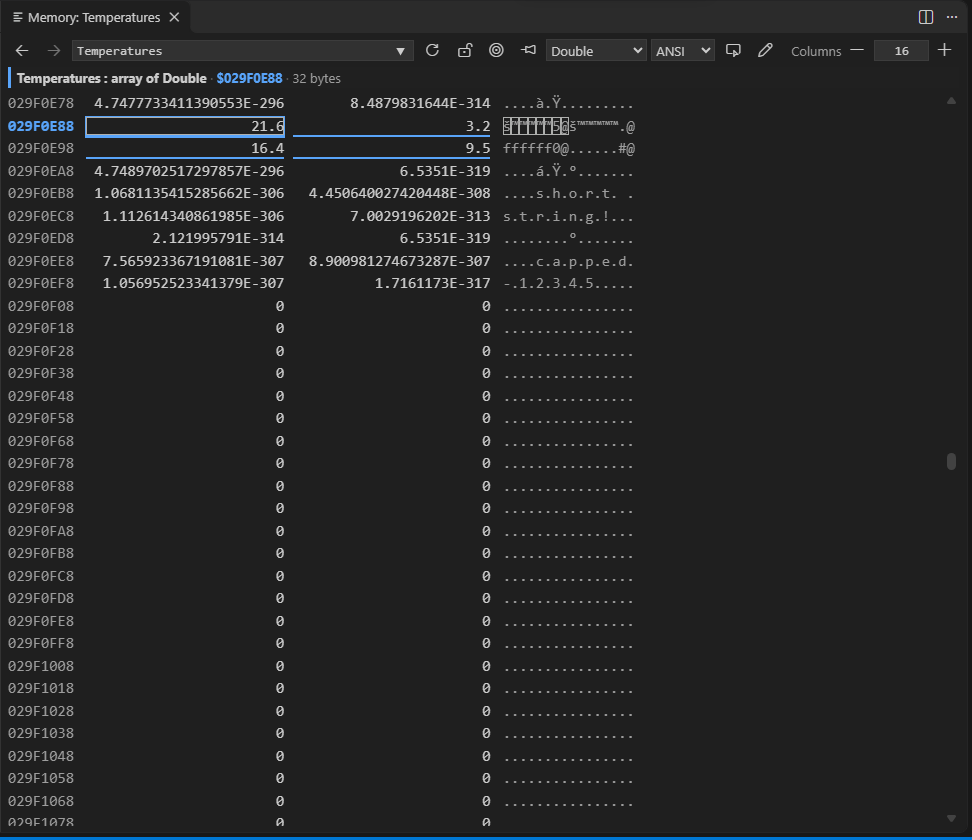
Temperatures: array of Double in the Double format: the four elements 21.6, 3.2, 16.4 and 9.5.
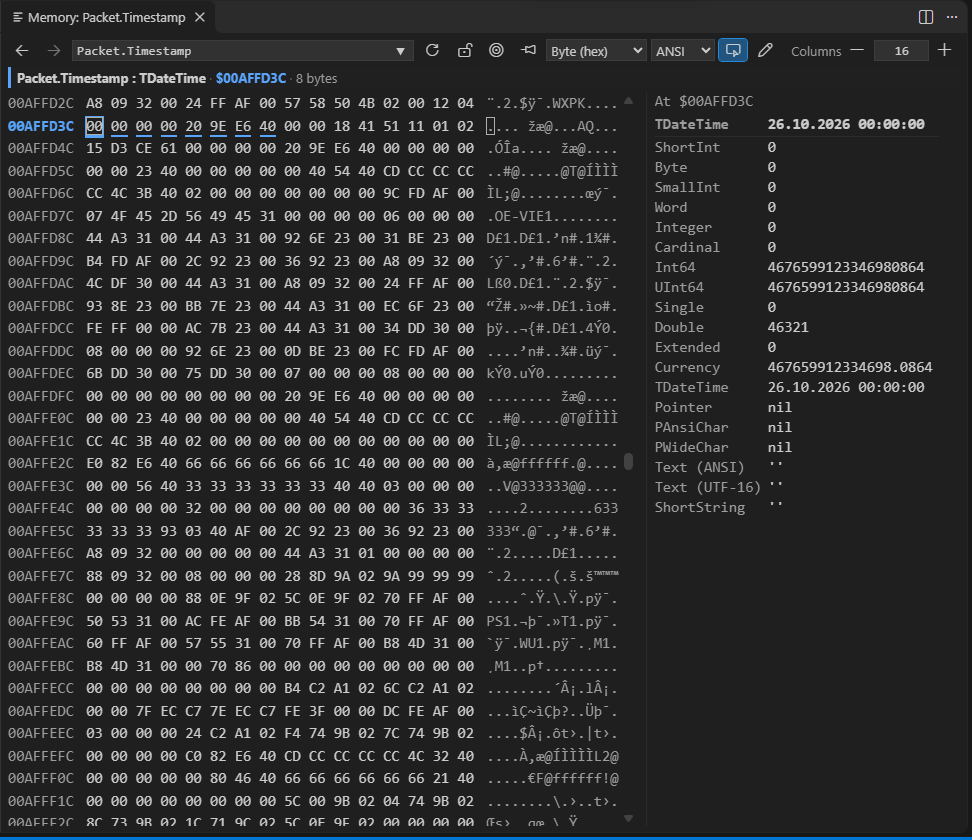
The data inspector on Packet.Timestamp. The first row reads the bytes as the declared type: TDateTime 26.10.2026 00:00:00.
Follow a pointer, and back
A double-click on the second field of Uplink follows the pointer held there to the string 'Vienna Central'. Back returns to the object.
Enter, a double-click or Follow Pointer in the context menu reads the pointer-sized value at the cursor and shows the memory at that address; a nil value is refused. Back and Forward (Alt+Left, Alt+Right) walk a history of up to 50 targets and restore the scroll position and the cursor of each.
Find bytes or text, copy them as Pascal
Ctrl+F opens a search bar for hex bytes or for ANSI, UTF-16 or UTF-8 text, case-sensitive. Next and Previous (F3, Shift+F3) search the memory of the program forward or backward from the cursor, skip pages that cannot be read, and stop after 64 MiB with the range searched stated.
The context menu copies the selection as hex, as text in the encoding of the text column, or as a Pascal array of Byte constant, and copies the address of the cursor. Ctrl+C copies hex.
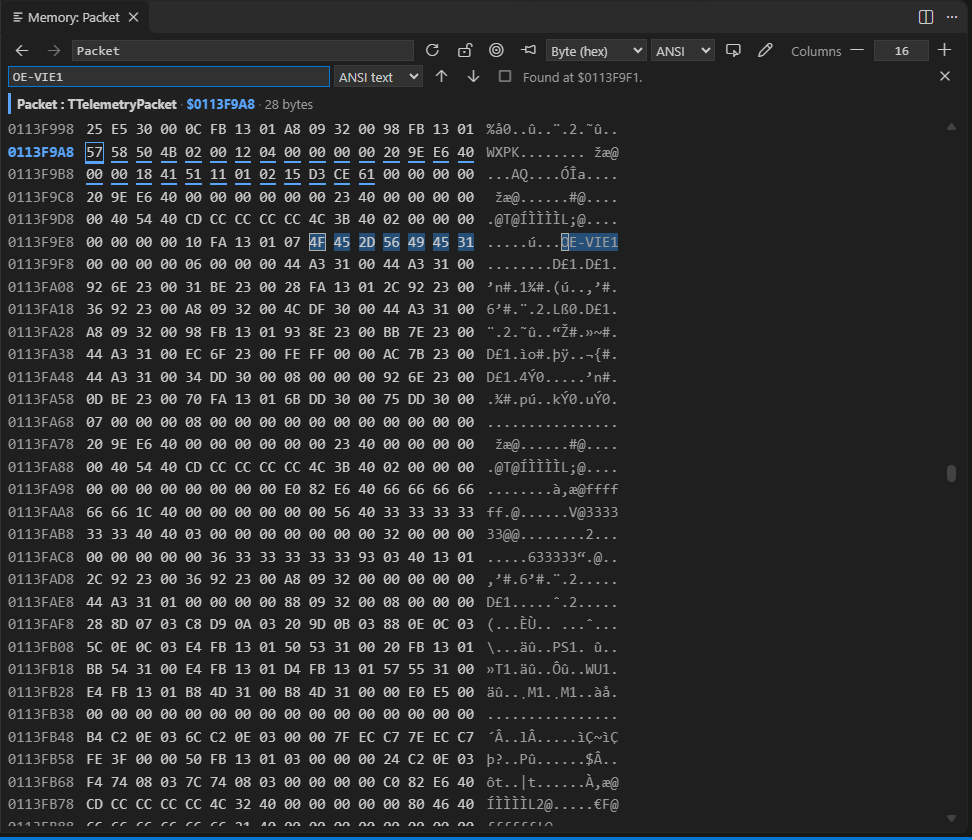
OE-VIE1 searched as ANSI text and found at $0113F9F1; the match is selected.
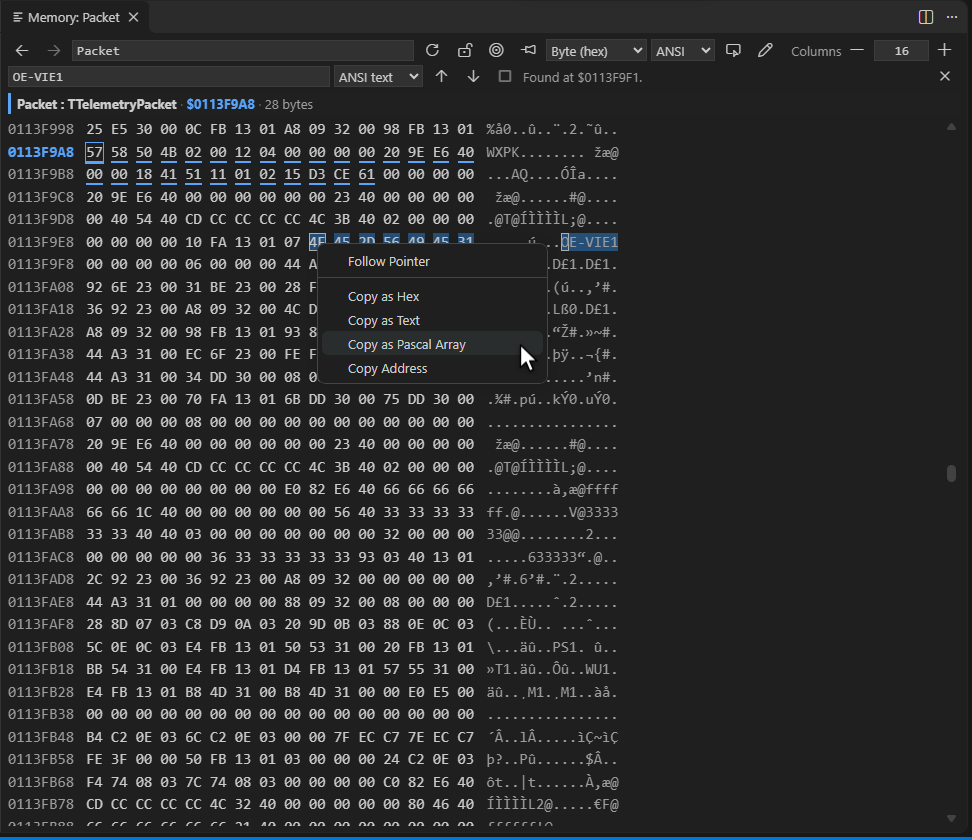
The context menu of the grid: Follow Pointer and the four copy forms.
array[0..6] of Byte = (
$4F, $45, $2D, $56, $49, $45, $31);Bytes and values, written to the stopped program
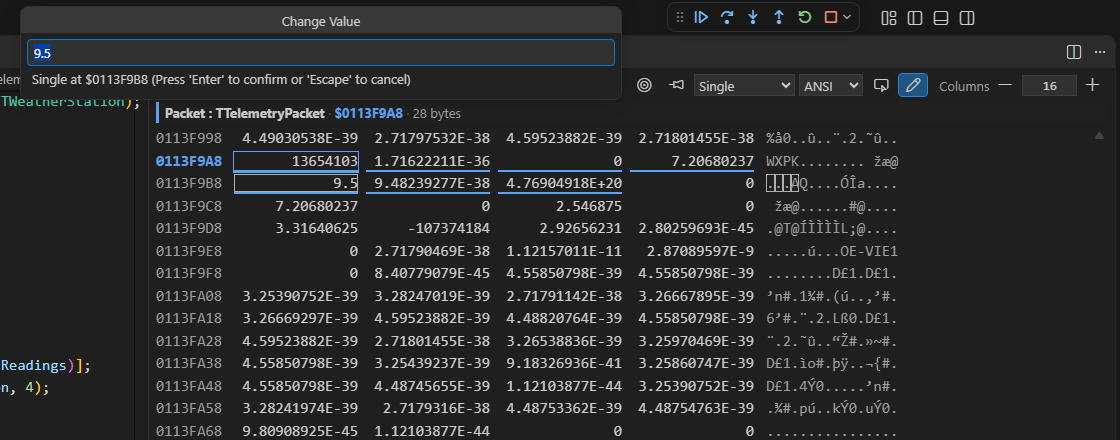
Change Value… on the Temperature field of Packet, in the Single format. The input box offers the current value, 9.5.
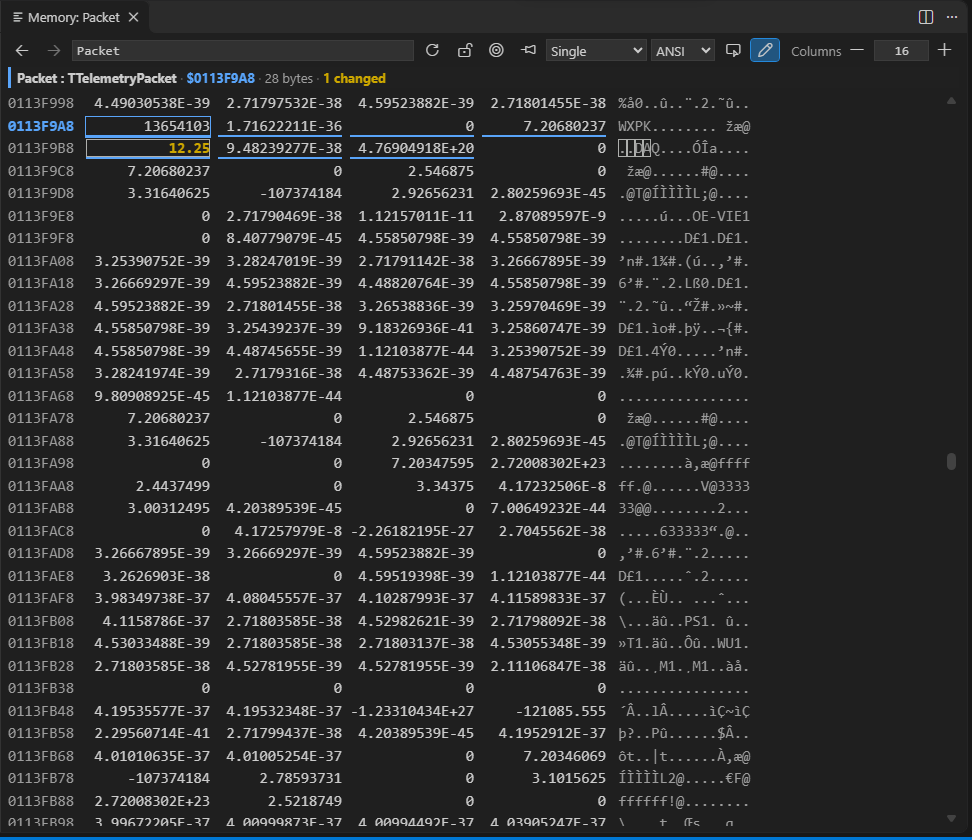
12.25 written. One byte of the Single differs from 9.5; it is marked as changed and counted in the header line.
- Edit mode is switched on per view, with the pencil button of the toolbar, and is off in every new view.
- In the Byte (hex) format, typed hex digits overwrite the byte at the cursor; the cursor moves to the next byte.
- Change Value… (F2, Enter, or the context menu) writes a value typed in the display format of the view, such as -1, 12.25 or $FF. The value is checked against the range of the format before it is written.
- After a write, the Variables and Watch views are read again, and every memory view of the session marks the written bytes as changed.
- Writes are refused while the program runs. A write cannot be undone.
Refreshed at every stop, following the value
- At every stop, each view reads its rows again and highlights the bytes changed since the previous stop. The highlight fades over about four seconds; the changed color stays until the next stop. A Set Value in the Variables view counts as a change as well.
- An expression is evaluated again at every stop, in the selected stack frame. When a string or a dynamic array has moved to new memory, the view shows the new address and states so; when the expression is out of scope, the view keeps the last address.
- The lock button keeps the current address instead of following the expression.
- While the program runs, the grid is dimmed and no memory is read. The views of a session close when the session ends.
Ctrl+Home) returns to it with the row above in view.??, also before readable ones.nil, locked or running.Read from the process, page by page
In a Windows debug session the view reads and writes the memory of the program with ReadProcessMemory and WriteProcessMemory; in a Linux64 session through lldb. A range is read in 4 KiB pages, so a page that cannot be read shows as ?? without hiding the readable pages around it. Memory is read only while the program is stopped.
On Windows, a byte at a breakpoint location reads as $CC, the int 3 instruction placed there by the debugger. Data memory is not affected.
The memory view, part of Vallenta Studio Pro
The memory view is part of the debugger on the Pro plan. Every Pro feature is available free for 5 days after registration.